Pre-construction software for contractors

From the drawings to the price you send, on one bid.

Filippo is for estimators at commercial and industrial contractors. Measure the drawings, price the estimate from those quantities, compare subcontractor quotes and submit the tender, all in one place.

  1. 01 Measure the slab
  2. 02 Count the pad footings
  3. 03 Run the edges and thresholds
  4. 04 Price it in the estimate

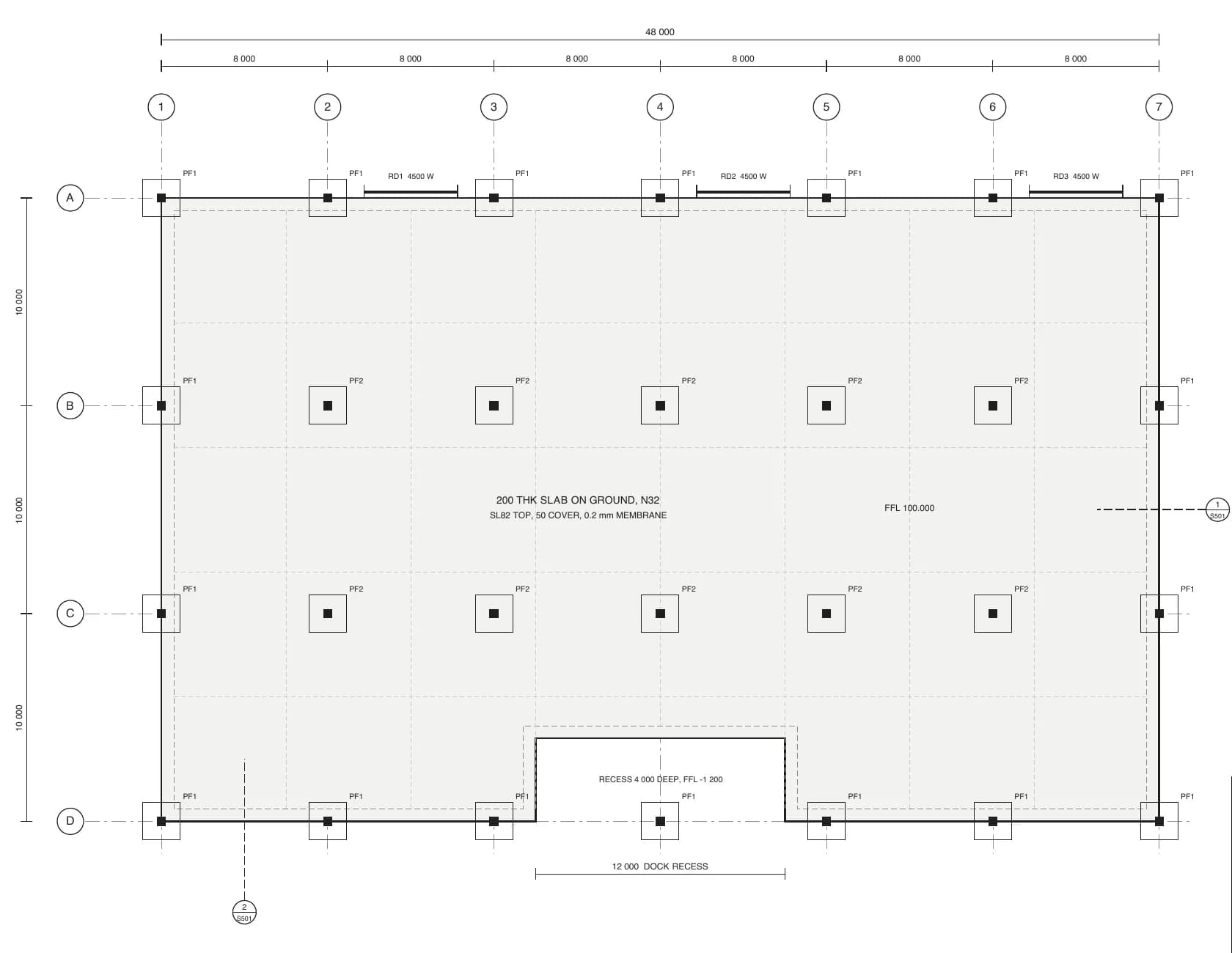
A footing and slab plan for a sample warehouse is measured: Warehouse slab, 1,392.00 m²; Pad footings, 28 no.; Thickened edge, 164.00 m; Threshold angle, 13.50 m. The slab's concrete then prices the estimate line Slab concrete, supply, place and finish, $106,722.72.

A sample drawing and sample figures, made up for this page.

One bid holds

  1. Overview
  2. Drawings
  3. Estimate
  4. Procurement
  5. Programme
  6. Submission

What Filippo does

Each part works on the same bid, so the take-off, the estimate, the quotes and the price stay connected.

01 Drawings

Take-off from drawings

Upload PDF drawing sets and measure areas, lengths and counts on each sheet. Each measurement works out further quantities from its own properties, such as a slab's concrete, mesh and excavation from its area and depth.

  • Set the scale from the drawing or a known dimension
  • Deduct pits and penetrations from an area
  • A new revision of a sheet keeps its measurements, marked for checking
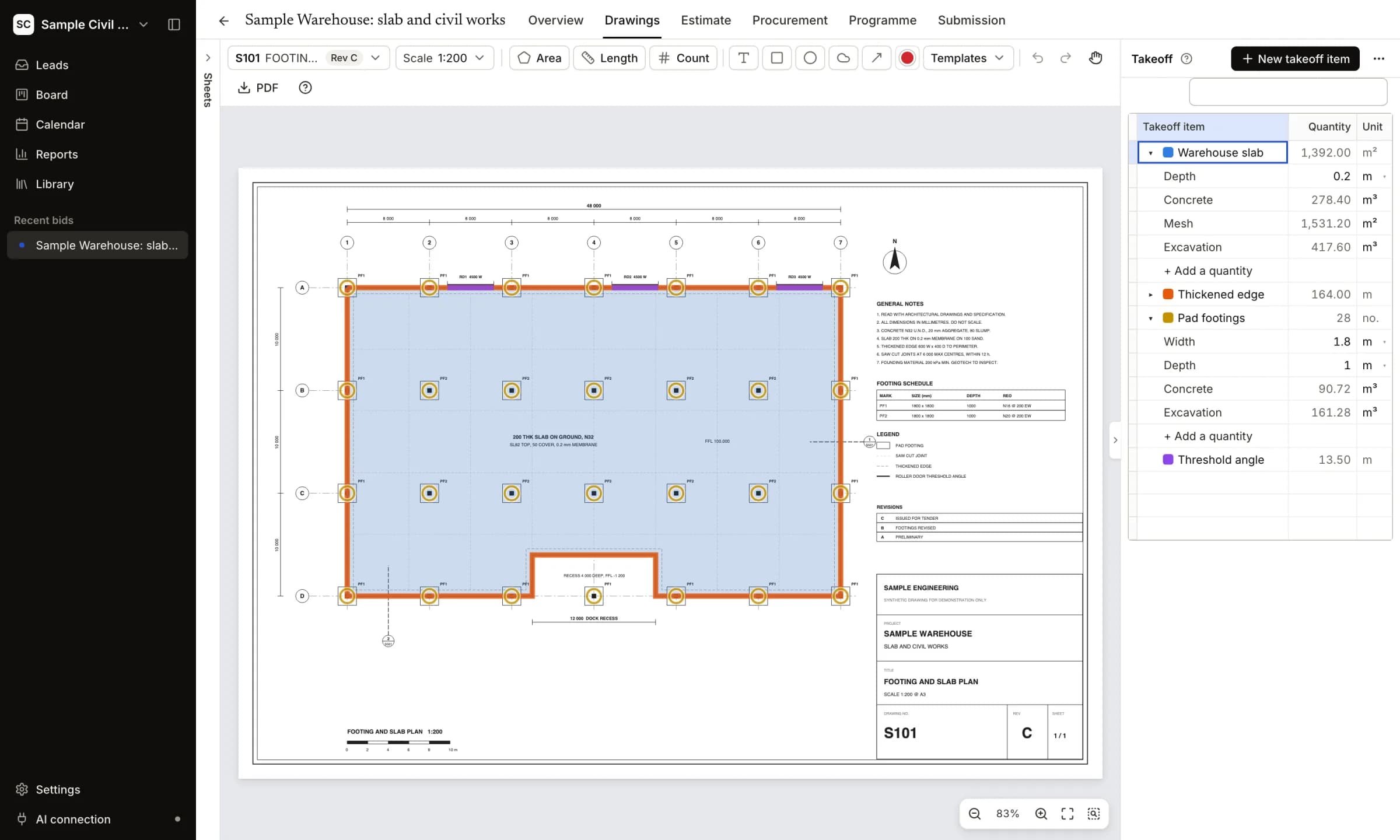
Filippo's Drawings tab with a sample footing and slab plan measured: the slab, the thickened edge, 28 pad footings and the door thresholds, with their quantities in the takeoff list.
Filippo, with a sample bid

02 Estimate

Estimate with a worksheet behind every line

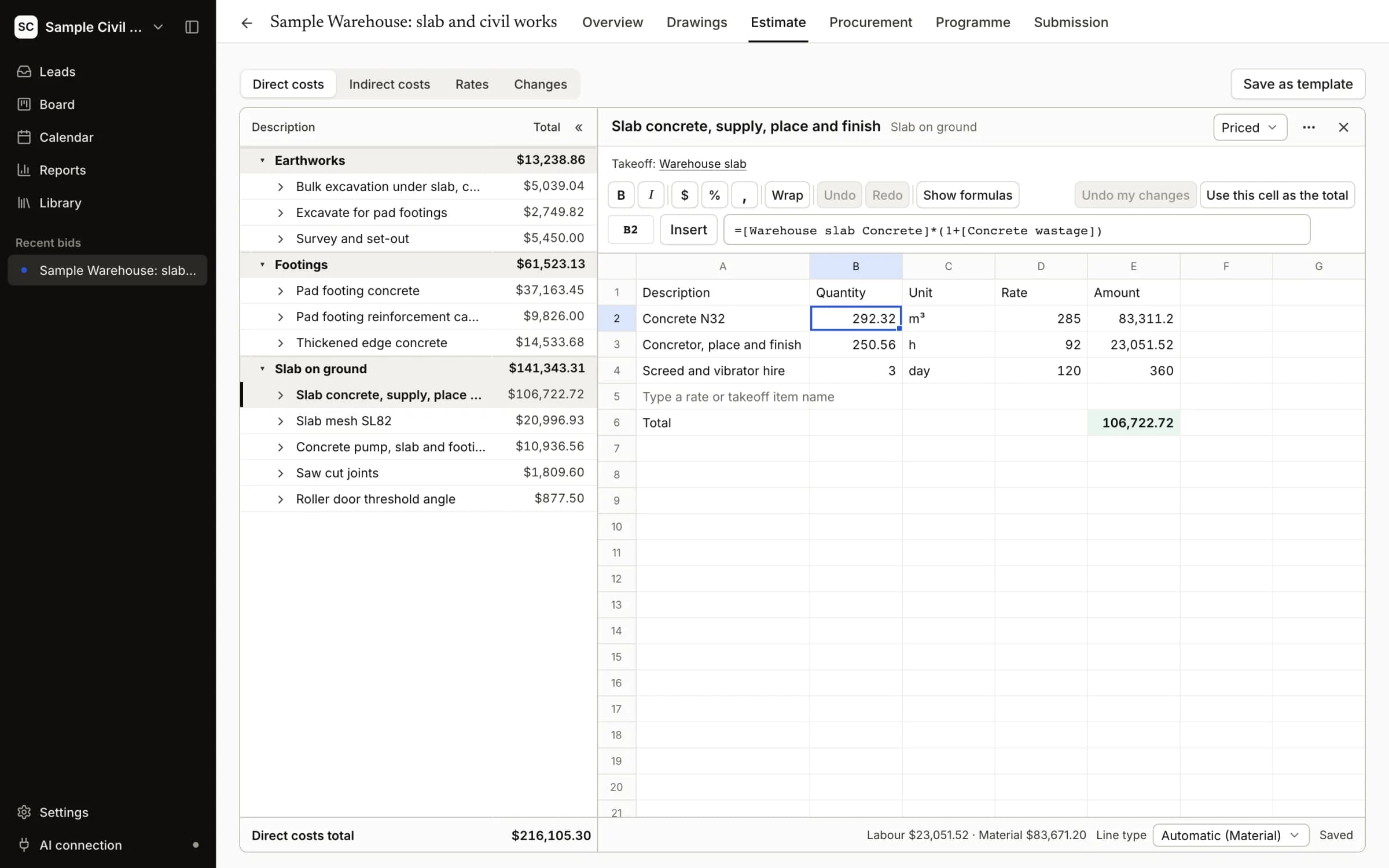
Price direct and indirect costs in one grid, under your own headings. Each line opens an Excel-style worksheet whose formulas read the takeoff and the bid's rates by name, so a change to a measurement or a rate flows through to the total.

  • Rates, assemblies and templates kept in the company library
  • Each bid keeps its own copy of the rates
  • Changes to quantities and rates listed for approval
Filippo's Estimate tab for the sample bid: direct costs under Earthworks, Footings and Slab on ground, with the slab concrete line's worksheet open beside them.
Filippo, with a sample bid

03 Procurement

Subcontractor quotes, side by side

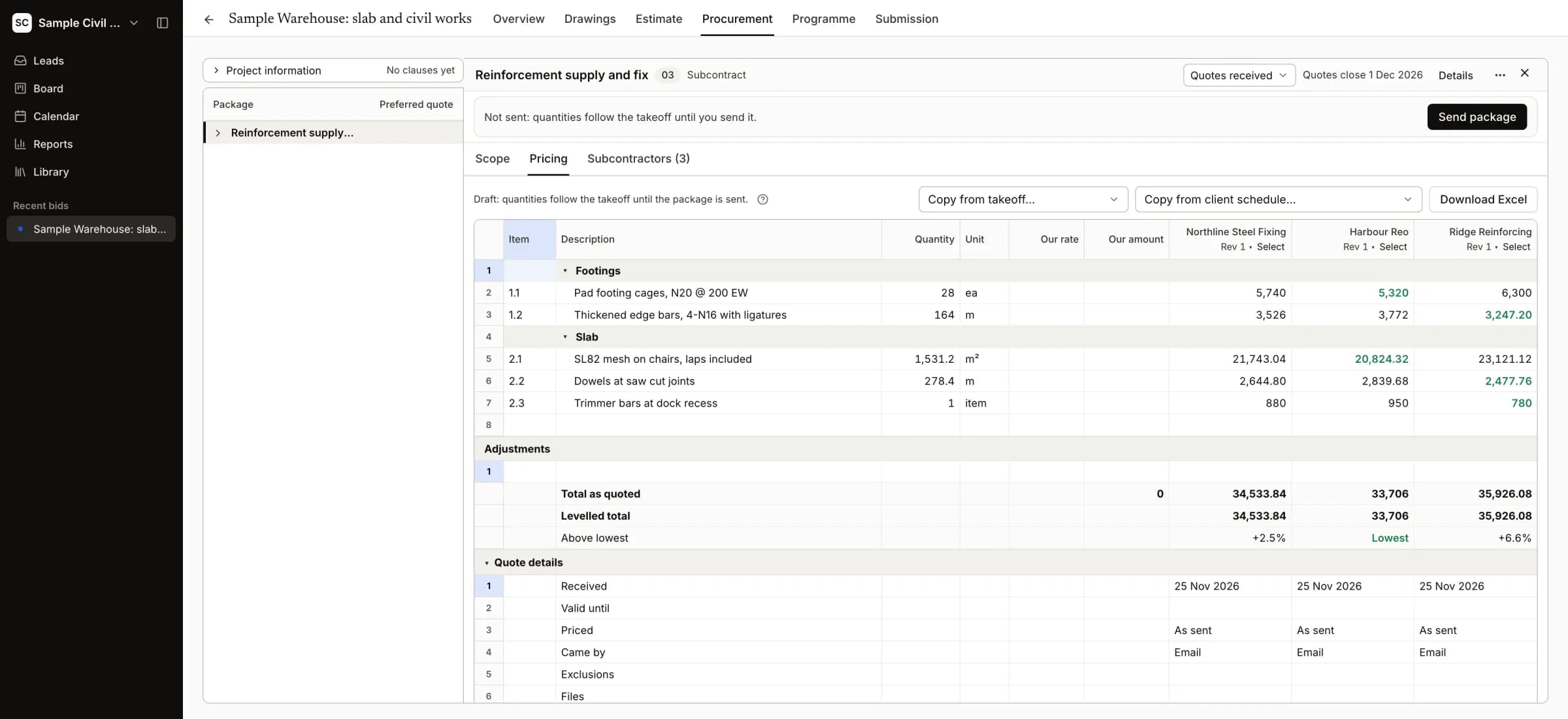
Set up packages with a scope of works and a bill of quantities that reads the take-off. Each subcontractor gets their own link to read the documents and enter their rates, without an account. Level the quotes, then add the preferred one to the bid's rates.

  • Quantities follow the take-off until the package is sent
  • Addenda ask for a new price on what changed
  • The lowest levelled quote is marked
A sample reinforcement package in Filippo: a bill of quantities read from the take-off, with three subcontractors' quotes compared and the lowest marked.
Filippo, with a sample bid

04 Bid board

Every tender on one bid board

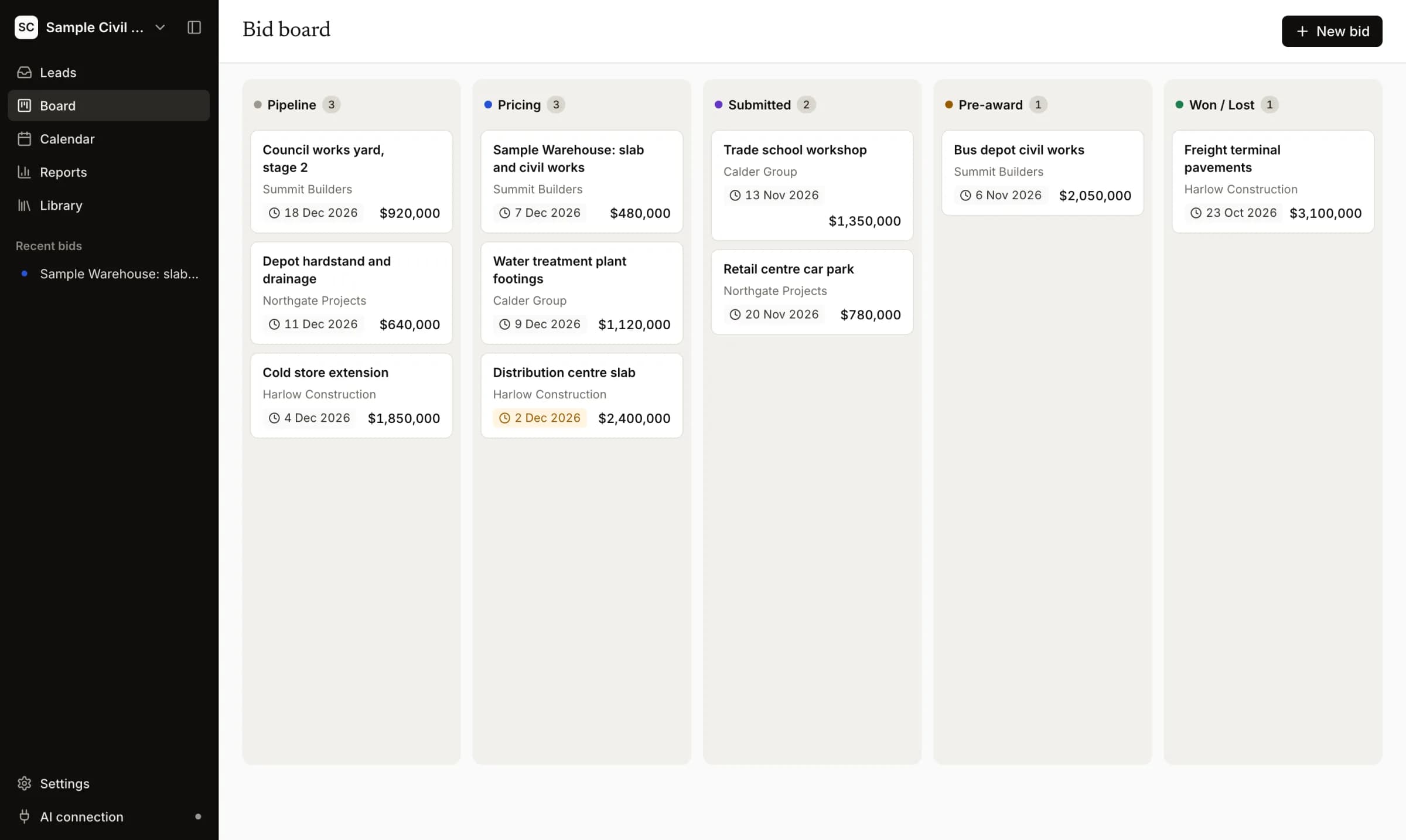
Each tender sits on the board by stage: Pipeline, Pricing, Submitted, Pre-award and Won / Lost, with its client, price due date and value. Type leads in or paste them from Excel, score each against your bid criteria and record the go or no-go decision.

  • Price due dates on a calendar and a timeline
  • Reports on hit rate, value won and why work was lost
  • The card shows the estimate or the latest price sent
Filippo's bid board with sample tenders in the Pipeline, Pricing, Submitted, Pre-award and Won / Lost columns.
Filippo, with a sample bid

Programme

Build a simple construction programme of phases, activities and milestones in weeks. Time-related costs are priced per week of the programme, and the estimate shows which lines moved when the weeks change.

Submission and revisions

Import the client's pricing schedule from Excel or CSV, or use your estimate's headings. Apply mark-ups, issue a revision as a fixed copy of the whole estimate, and log what was sent to the client, when and for how much.

Calendar and reports

See price due dates and tasks on a calendar or a timeline. Reports show your hit rate, value won and lost, tendering cost per bid won, results by client, and why you lost or declined work.

Works with Claude

Connect Claude, ChatGPT or another assistant to your company's data through the AI connection. It can do most of the work the screens do. Actions that commit you, such as issuing a revision or sending a package, stay with a person, and anything the assistant measures is marked for a person to check.

How it works

  1. 01

    Set up your company

    Sign up with email and password, Google or Microsoft, choose metric or imperial units, and invite your team with a link.

  2. 02

    Add a lead and decide

    Add the tender as a lead, score it against your bid criteria and decide whether to bid it.

  3. 03

    Measure and price

    Upload the drawings, do the take-off, price the estimate and get quotes from subcontractors, all on the same bid.

  4. 04

    Submit and follow up

    Issue a revision, log the submission to the client and track the result on the board.

Security and hosting

Hosted in Sydney

Filippo runs on Amazon Web Services in Sydney, Australia. The database, uploaded files and sign-in records are kept there.

Each company kept separate

Everything belongs to one company, and nobody outside that company can see it. An assistant connects with a person's own login and sees only that person's company.

Sign-in options

Sign in with an email and password, a Google account or a Microsoft account. Connections are encrypted, and the database and file storage are encrypted.

No AI model of our own

Filippo does not send your data to an AI model. Your data reaches an assistant only when someone in your company connects one.

Read the privacy policy and the terms of service.

Start with your next tender

Set up your company, upload the drawings and start the take-off on your next bid.